Last updated: October 29, 2026
Quick Answer: A content operations dashboard for writing teams should center on 5 core metrics: cycle time, throughput, stage status, blocked work, and handoff age. In this guide to Content operations dashboard metrics for writing teams, those numbers show where work slows, how much gets finished, and which handoffs create delays.
In short: a content operations dashboard should help a content team see where work slows down, how much gets finished, and which handoffs create delays. A good content operations dashboard does not replace project management or analytics software; it gives the team a shared operational view of cycle time, stage status, bottlenecks, throughput, and output tracking so managers can act before deadlines slip.
Key Takeaways
- Show flow metrics first; save decorative details for later.
- Track cycle time, throughput, stage status, and bottlenecks on the main view.
- Compare stage timing, queue size, and item age to find slow points.
- Surface every handoff that can stop work, not only final approval.
What a content operations dashboard should show first

A content operations dashboard should show stage status, cycle time, throughput, and blocked work before it shows anything decorative. Those four signals answer the questions an editor, producer, or content ops lead asks every day: what is in progress, how long it has been moving, how much the team is finishing, and where work is stuck.
Start with the production path the team actually uses, not a fantasy process with 12 steps. If a piece moves through brief, outline, draft, edit, SEO review, approval, and publish, the dashboard should reflect those stages exactly. A dashboard that shows “in review” for three separate departments sounds tidy, but it hides the handoff point that caused the delay.
The most useful dashboards are operational rather than ceremonial. They help the team manage flow at the level of individual assignments and the overall queue. That means showing the number of items in each stage, the average time between stages, and the count of items waiting on someone outside the writing team. A 5-item queue in editing looks very different from a 20-item queue in stakeholder approval, even if both are labeled “in progress.”
This is also where the dashboard earns its place against the broader content workflow software stack. Workflow tools can assign tasks and move cards. The dashboard should turn that movement into a live picture of production health.
A useful rule: if a metric does not help decide what to do in the next 24 hours or the next sprint, it probably belongs in a report, not on the main dashboard.
Which metrics belong on the main view?
The main view should track cycle time, throughput, stage status, and bottlenecks, with output tracking as a supporting metric. That is enough to tell whether the team is moving work or merely rearranging it.
A practical dashboard view often includes these measures:
- Cycle time: how long a piece takes from start to finish, or from one stage to another.
- Throughput: how many pieces the team completes in a fixed period, such as 1 week or 1 month.
- Stage status: how many items sit in draft, review, approval, or published.
- Bottlenecks: stages where work piles up or spends longer than the rest.
- Output tracking: completed pieces by type, campaign, format, or owner.
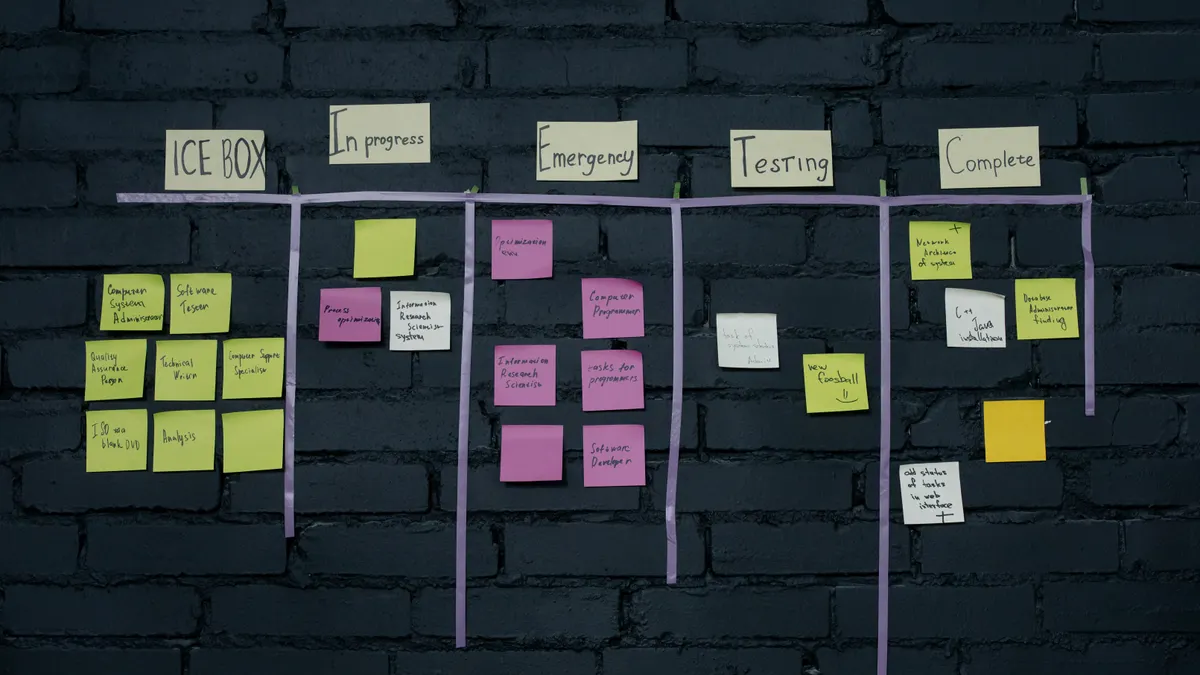
A simple 4-column dashboard is often better than a crowded one. One column can hold active work, one can hold items waiting on feedback, one can hold overdue tasks, and one can hold finished output for the current month. That layout helps the team see both flow and inventory.
The trade-off is that a compact dashboard may hide detail. A content lead who wants a single screen cannot also expect deep diagnosis. Even so, the point of the dashboard is to show where to look next, not to explain every delay in the same view.
One caution: throughput alone can mislead. A team can finish 18 short posts in a week and still be in trouble if long-form pages sit untouched for 3 weeks. Pair throughput with cycle time so output volume does not hide slow delivery.
For metrics that need a definition beyond the team, keep terminology aligned with standard process language from the American Society for Quality and the Project Management Institute. Those references help keep cycle time and throughput from turning into vague dashboard jargon.
How do teams spot bottlenecks in writing workflow?

Teams spot bottlenecks by comparing stage times, queue size, and the age of items waiting in each step. If one stage regularly holds more items than the others, or if the same owner’s queue keeps growing, the bottleneck is usually visible before anyone has to guess.
The quickest way to find it is to look for three patterns:
- Long dwell time in one stage. If draft work usually takes 2 days but approval takes 9, approval is the choke point.
- Growing queue size. If 6 items are waiting in edit and 1 is waiting in outline, the edit stage is under capacity or overworked.
- Repeated handoff delays. If work sits after “sent for review” but before “returned comments,” the delay may be outside the writing team’s control.
A useful dashboard shows the age of the oldest item in each stage, not just the average. Average age can hide one piece that has been stuck for 14 days while the rest moved quickly. That single item often reveals the exact failure point: missing reviewer, unclear brief, no named approver, or conflicting feedback.
When diagnosing bottlenecks, separate operational delay from creative delay. A writer may need 2 extra days because the subject matter is complex. That is different from a stage that often waits 4 days for sign-off. The first is a planning issue; the second is a process issue.
A good dashboard also lets the team distinguish between a temporary spike and a structural problem. A 1-week backlog after a product launch is normal. A monthly backlog at the same stage is a process defect.
How should a dashboard handle handoff visibility?
A dashboard should show every handoff that can stop work, not just the final approval. Handoffs are where most content flow breaks, because each transfer adds uncertainty: who has it now, what changed, and what is still missing.
The simplest way to improve handoff visibility is to show the owner, the next owner, and the timestamp of the last move. That creates a chain the team can read in seconds. Without it, a card marked “in review” can mean anything from “waiting on legal” to “sent to an editor who never opened it.”
The dashboard should also show handoff type. Internal handoffs, such as writer to editor, are different from cross-functional handoffs, such as editor to legal or marketing ops to CMS publishing. Each has a different delay pattern. If content routinely stalls at a legal review stage, the fix may be a standardized checklist, not more reminders.
This is where a dashboard can outperform a plain task board. A board shows the current step. A dashboard can show the path. That matters when one article passes through 5 people and one of them is outside the content team.
Do not overbuild this part. If a dashboard requires 8 clicks to find the current owner, it has failed. The point is to reduce follow-up messages and meeting time, not replace one form of chasing with another.
A good rule is to surface any handoff older than 48 hours on the main view. That threshold will vary by team, but the idea is the same: stale handoffs should not hide behind normal status labels.
A simple way to build the dashboard from existing work
Because the team already has working stages, the fastest way to build a useful content operations dashboard is to map those stages, assign one metric to each stage, and review the view weekly for 30 minutes. Start small, then add detail only where decisions get better.
Use this sequence:
- List the real workflow stages. Write down the 5 to 7 steps the content team actually uses, such as brief, draft, edit, approval, and publish. The result is a dashboard that matches daily work instead of a generic template.
- Choose one metric per stage. Use queue size for active stages, age for waiting stages, and completion count for finished work. That gives each stage a purpose without filling the screen with noise.
- Set a weekly reporting window. Review the last 7 days for throughput and the last 30 days for cycle time trends. Short windows catch urgent blockers; longer windows show whether delays are recurring.
- Mark blocked items separately. Add a visible blocked flag for items waiting on feedback, assets, or approval. That stops blocked work from being mistaken for active progress.
- Review the dashboard in a standing meeting. Keep it to 20 or 30 minutes and focus on the top 3 exceptions. The result should be an action list, not a status recital.
If the team already uses a project tool, connect the dashboard to that system rather than duplicating tasks by hand. Manual entry is where dashboards lose trust. Once people think the numbers are stale, they stop using them.
The main limitation is that a dashboard cannot fix a broken process by itself. If briefs are vague, approvals are unwieldy, or ownership is unclear, the numbers will only make the pain visible faster. That is still useful, but it is not a repair.
Common dashboard mistakes that distort the numbers
The biggest mistake is tracking too many metrics and none of them clearly. A dashboard with 18 indicators often creates argument instead of action. The cost is attention: the team spends 10 minutes interpreting the screen and 0 minutes fixing the delay. The fix is to keep the primary view to a small set of operational measures and push the rest into drill-down reports.
Another mistake is mixing output tracking with quality judgment. If the dashboard shows volume only, teams may chase quantity and publish weaker work. The cost is obvious: more pieces, less usefulness. The better approach is to keep quality review separate, using an editorial rubric or review notes, while the dashboard tracks flow and completion.
A third mistake is using averages without the distribution behind them. A 6-day average cycle time can hide one piece at 1 day and another at 15. That distortion matters because the slow item is usually the one creating pressure. A median, oldest-item age, or stage-level view gives a truer picture than a single average.
Another trap is measuring every owner the same way when their work is not the same. A senior editor handling policy-heavy content will not move at the same pace as a writer producing product-led blog posts. If the dashboard ignores that difference, it will punish the wrong person. Use the same definitions, but compare like work with like work.
Finally, do not let the dashboard become a surveillance wall. If every click is framed as performance monitoring, people will optimize for the screen instead of the work. A content operations dashboard is most useful when it helps the team clear blockers quickly and make handoffs visible.
What metrics help manage content production?
The most useful metrics for managing content production are cycle time, throughput, stage status, blocked work, and handoff age. Those measures tell a lead whether the team is shipping, slowing down, or stuck on a specific step.
Cycle time answers how long work takes. Throughput answers how much work gets finished. Stage status answers where the queue is. Blocked work answers what needs intervention now. Handoff age answers where attention has gone stale. Used together, they give a complete operational picture without turning the dashboard into a reporting suite.
A content team should resist the urge to manage by one number. Throughput alone can reward speed at the expense of revision quality. Cycle time alone can hide a burst of output that is not sustainable. Stage status alone can show activity without completion. The dashboard works best when it combines all three layers: speed, flow, and finish.
The practical test is simple. If the dashboard can help answer “What is stuck?”, “How much will we finish this week?”, and “Where should I intervene first?”, it is doing its job. If it cannot answer those questions in under a minute, it needs fewer metrics and clearer stages, not more decoration.
For a team already operating inside content workflow software, this dashboard becomes the control surface that makes the workflow visible. It does not replace planning, editing, or publishing. It shows whether those pieces are moving in the right order.
FAQ
What should a content operations dashboard track?
A content operations dashboard should track stage status, cycle time, throughput, blocked items, and handoff age. Those signals show where content sits, how fast it moves, and where work gets stuck. A team can add output by format or owner, but the core view should stay focused on flow rather than vanity counts.
How do teams spot bottlenecks in writing workflow?
Teams spot bottlenecks by comparing queue size, dwell time, and the age of the oldest item in each stage. A stage that holds work longer than others, or keeps accumulating items, is usually the bottleneck. The fix is to inspect the handoff, staffing, or approval rule at that stage first.
What metrics help manage content production?
The metrics that help manage content production most are cycle time, throughput, stage status, and blocked work. Those measures show whether the team is finishing enough work, how long it takes, and where delays live. Output counts help too, but only when they stay tied to specific formats or stages.
Drafted with AI; not yet reviewed by a person.