Last updated: October 29, 2026
Quick answer: content workflow software for idea to publish is worth it for teams that need 6 clear statuses and visible ownership from idea capture to published draft. In short, content workflow software for idea to publish is the system that moves a content idea from capture, to assignment, to draft, to review, to publishing handoff, with clear status at every step. It suits teams that need fewer lost ideas, fewer “who owns this?” moments, and a cleaner path from a rough note to a published draft.
What content workflow software actually does
Content workflow software for idea to publish gives a content team a shared route from idea capture to published draft, with each stage named, owned, and visible. That matters because content work breaks down most often at handoffs, not at the moment someone writes the first sentence.
The job is operational, not creative. A tool in this category should answer five questions at any moment: Where did the idea come from? Who owns it? What stage is it in? Who needs to review it? What happens next? If the software cannot answer those questions in one screen, people fall back to spreadsheets, Slack threads, and memory.
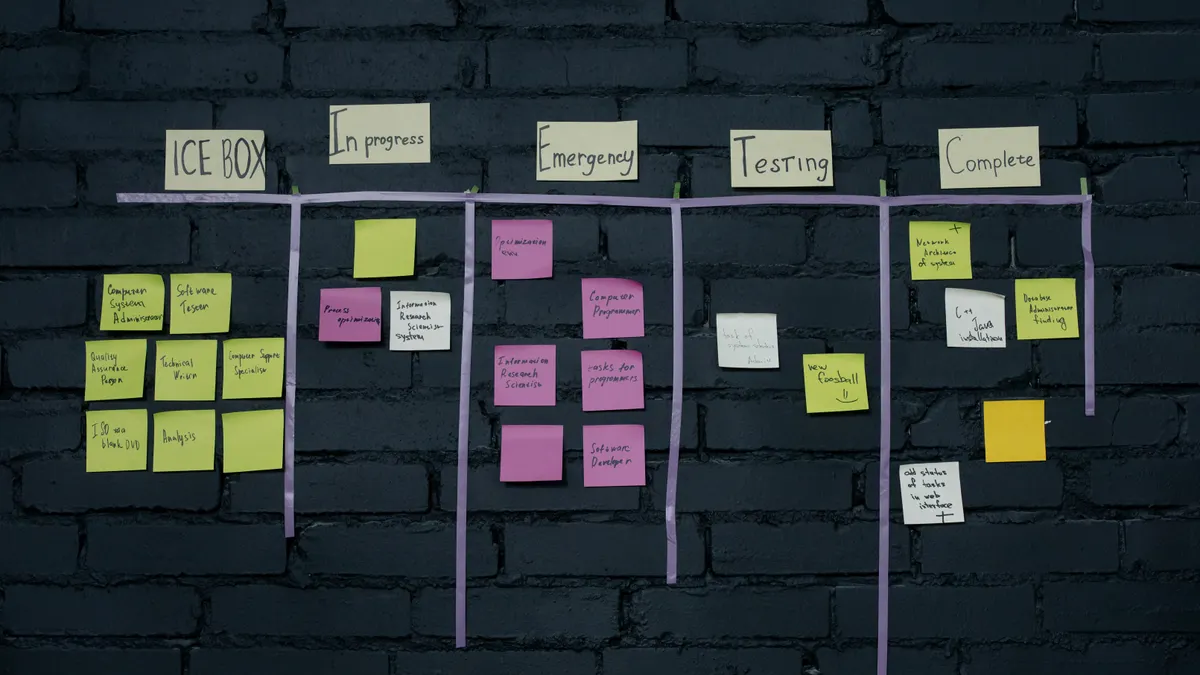
A useful way to think about the system is as a relay with 4–6 legs. The idea arrives. Someone triages it. A writer gets it. Draft stages move it forward. Review stages keep it honest. Publishing handoff sends it to the channel owner, CMS, or scheduler. Workflow status is the visible marker on that path: queued, assigned, drafting, in review, approved, ready for publish, or done. The exact labels can vary, but the logic should stay stable.
This is not the same thing as an editorial calendar. A calendar shows timing. Content workflow software for idea to publish shows responsibility and movement. It is also not the same as a document editor with comments. Comments help inside a draft, but they do not manage the whole route from idea capture to publishing handoff.
The honest trade-off is speed versus control. More steps and tighter status control reduce ambiguity, but they also add setup work and more clicks. That is useful for a team with several contributors and reviewers. It is overkill for a solo creator who can move an article from outline to publish in one sitting.
Which teams need it, and who should skip it?

Content workflow software for idea to publish is most useful for teams that touch the same draft more than once before publication. That usually means a marketer, editor, subject-matter reviewer, and channel owner are all involved at different points. Once a draft passes through 3 or more people, informal coordination gets expensive.
The strongest use case is a team that publishes on a repeatable cadence and cannot afford vague ownership. If a piece sits in limbo for 2 days because nobody knows whether it is waiting on source review or final approval, workflow software earns its keep. The same is true when multiple content types share a pipeline: blog posts, landing pages, newsletters, and case studies often need different review paths, but they still need one visible system. According to the Content Marketing Institute, documented workflows are a common operational practice in organized content teams.
It is weaker for a single writer who publishes directly into a CMS. In that case, workflow software can become another place to update status without adding much value. A simple checklist or lightweight board may be enough. It is also a poor fit if every piece follows a one-off process. A workflow only helps when the sequence repeats.
The main reason teams overbuy here is the hope that software will fix unclear editorial rules. It will not. If the team has no agreement on who approves claims, when legal review is required, or what “ready to publish” means, the tool just preserves the confusion in a new interface. A workflow engine can enforce a process, but it cannot invent a process that does not exist. The Society for Technical Communication has long emphasized clear process and role definition in content operations.
One useful test: if your content moves through at least 5 status changes and one handoff outside the writer’s control, software is worth considering. If not, the process is probably too small to justify the overhead.
How does a content workflow move from idea to publish?
A content workflow moves from idea to publish by turning a rough note into a staged asset, with one owner and one next action at each step. The sequence matters because every stage should have a different job, not just a different label.
-
Capture the idea in one place. Use a form, inbox, or intake board that collects a title, short brief, channel, and priority. The result should be a card that can be sorted in under 30 seconds instead of buried in email.
-
Triage the idea against current goals. A content lead or editor checks whether the topic fits the next 2–4 weeks of work, has a real audience, and deserves a slot. The result is a clear yes, no, or park-for-later decision.
-
Assign the work. The task goes to a named writer, editor, or producer, with a due date and status such as “assigned” or “in progress.” That removes the vague “someone should probably get to this” problem.
-
Move through draft stages. Many teams use 2 draft states: outline and full draft. Others use 3: outline, first draft, and revised draft. The point is to separate early shaping from polishing, so the editor sees where the piece stands without opening the file.
-
Route review. Review can be editorial, legal, brand, SEO, or subject-matter specific. Each reviewer should have a defined reason to touch the draft; otherwise the queue grows with no real gain.
-
Finish the publishing handoff. The approved draft is moved to the person or system that uploads, schedules, or publishes it. Status should change to something like “ready for publish” or “scheduled,” so the team can distinguish finished work from finished-and-live work.
The sequence above works best when each step closes one door and opens the next. The mistake is letting all work happen in one blended “in progress” state. That sounds flexible, but it hides stalls and makes reporting useless.
The workflow statuses that keep a team honest

The right workflow status is the smallest label that still tells the team what happens next. A good status removes uncertainty; a bad one creates it.
A clean set often starts with 6 statuses: idea captured, triaged, assigned, drafting, in review, and ready for publish. Some teams add blocked and published. That is enough for most content operations. More labels usually mean the team is describing problems instead of solving them.
Each status should answer a different operational question. Idea captured means the item exists, but nobody has accepted it. Triaged means someone has decided whether it belongs in the pipeline. Assigned means ownership is clear. Drafting means the writer is actively working. In review means the draft is waiting on input from someone else. Ready for publish means the draft is done inside the content process, even if it is not live yet.
The mistake most teams make is mixing activity with approval. “Editing” is not a status unless it changes who owns the next move. “Needs attention” is not a status unless it tells the team what kind of attention is needed. If a label does not change action, it belongs in a note field, not as a workflow stage.
There is also a hidden cost to too many statuses: reporting gets noisy. If one article can sit in 11 different states, nobody can tell where work actually slows down. With 6 to 8 states, bottlenecks become visible. A team can see that drafts spend 3 days in subject-matter review or that publishing handoff is the chronic delay.
A practical rule: if a status cannot be explained in one short sentence to a new hire, it is too vague or too clever. Simple beats clever because workflow is about movement, not naming contests.
The fields and handoffs that matter more than the tool brand
The right field set matters more than the logo on the software. A content workflow breaks down when the tool tracks the wrong things or leaves out the things the team actually needs to move work forward.
At minimum, the system should store title, owner, stage, due date, content type, channel, and reviewer. Those fields support assignment flow and make it possible to sort work by priority or status. If the team handles several publication paths, it also helps to track target URL, CMS destination, and approval owner. Those are ordinary operational details, but they prevent a lot of chasing later.
The handoff between review and publishing is where many teams lose time. Reviewers often think their job ends when comments are resolved. The publishing owner may think the piece is still waiting on approval. The fix is not more messages; it is a clear handoff field or status that says who receives the draft next and what “done” means at that point.
This is where software often differs in practice, even when the feature list looks similar. Some tools make handoffs explicit with task ownership, dependencies, and status changes. Others allow a loose pile of cards that only look organized. The second kind can work for a small team, but it tends to fail as soon as two reviewers touch the same draft.
There is a useful standard to keep in mind here: if the team cannot tell who owns the next move in a single glance, the workflow is under-specified. That is the operational test, not whether the interface looks tidy. As the Content Marketing Institute notes, visible ownership is central to repeatable content operations.
For teams that publish regulated or highly reviewed material, the same logic applies even more strongly. A publishing handoff should never depend on memory. It should be a named state, a named owner, and a clear next action.
Common mistakes that make workflow software feel useless
Content workflow software feels useless when the team uses it as a container for bad process. The tool then gets blamed for friction that started elsewhere.
One common mistake is mapping the old chaos into new statuses. If the team copies every informal step into software, the workflow becomes a maze. That costs time because nobody can tell which step matters. The better move is to reduce the process to the few handoffs that actually change responsibility.
Another mistake is assigning work before triage. That fills the board with half-formed ideas and creates fake urgency. Writers then spend time opening tasks that should never have entered the queue. The fix is to add a short intake and review step before assignment.
A third mistake is making review a black box. If review has no owner or deadline, drafts stall in “waiting” for days. That costs throughput and creates hidden bottlenecks. The better approach is to assign one review owner per category and set a clear due date, even if the due date is only 24 or 48 hours.
A fourth mistake is using workflow status to track mood instead of movement. Labels like “almost done” or “final-final” are a sign the team lacks a real publishing handoff. Replace those with a concrete state such as “approved,” “scheduled,” or “published.”
The last mistake is overcustomizing from day one. A workflow with 12 fields and 14 statuses looks thorough, but it usually slows adoption. Start with the smallest process that covers idea capture, assignment flow, draft stage, review, and publishing handoff. Then expand only when a real bottleneck appears.
The trade-off is straightforward: a lean workflow is easier to adopt, but it may miss edge cases; a complex workflow catches more exceptions, but it is harder to run daily. Most teams do better starting lean.
What to look for before choosing a tool
Content workflow software for idea to publish should fit the team’s real sequence, not just its wish list. That means the first question is not “Which platform has the most features?” It is “Which tool can represent the actual stages we use without forcing extra work?”
The practical shortlist is simple. Look for configurable statuses, clear ownership, due dates, task dependencies, and a way to separate draft stages from review stages. If the team publishes into a CMS, check whether the publishing handoff is visible enough that no one has to guess where a draft sits. If multiple people work in the pipeline, the interface should make workflow status obvious without opening every item.
Integration matters, but only after the process fits. A tool that connects to a calendar, CMS, or chat app may still fail if the underlying workflow is vague. A small team can live without fancy connectors. A larger team usually cannot live without clarity around handoffs and statuses.
The cost to run the system is not just subscription price. It also includes setup time, admin maintenance, and the discipline required to keep the statuses current. If updating the board takes longer than the work itself, the tool becomes overhead. If the team ignores status updates, the tool becomes decorative.
One useful way to judge fit is to ask what would happen after a 2-week vacation by the person who currently “knows how it all works.” If the answer is “the board would stop making sense,” the software is carrying undocumented process, not supporting it.
Content workflow software is worth choosing when it removes ambiguity from repeated work. It is not worth choosing to impress stakeholders or to replace editorial judgment with dashboards.
Key takeaways
- Content workflow software for idea to publish is for moving ideas through defined stages, not for replacing the editorial process itself.
- The most useful setup makes ownership, stage, and next action visible at all times.
- A small number of statuses usually works better than a long list of clever labels.
- The strongest value shows up at handoffs: assignment, review, and publishing.
- Teams with one writer and a simple publish loop may not need a full workflow tool at all.
- The best system is the one the team can keep current every day, not the one with the longest feature list.
What is content workflow software?
Content workflow software for idea to publish is a tool that tracks a content item from idea capture through assignment, draft stages, review, and publishing handoff. It helps teams see who owns the work, what stage it is in, and what happens next. The point is operational clarity, not more admin for its own sake.
How does a content workflow move from idea to publish?
A content workflow moves by passing a piece through defined statuses and owners. The usual sequence is idea captured, triaged, assigned, drafted, reviewed, and handed off for publishing. Each stage has one job, so the team can see whether the work is waiting, active, approved, or ready to publish.
What stages should a content workflow include?
A content workflow should include the stages the team actually uses, usually idea capture, assignment, drafting, review, and publishing handoff. Many teams also add blocked and published. The right set is the smallest one that makes ownership and next actions obvious without cluttering the process.
Drafted with AI; not yet reviewed by a person.